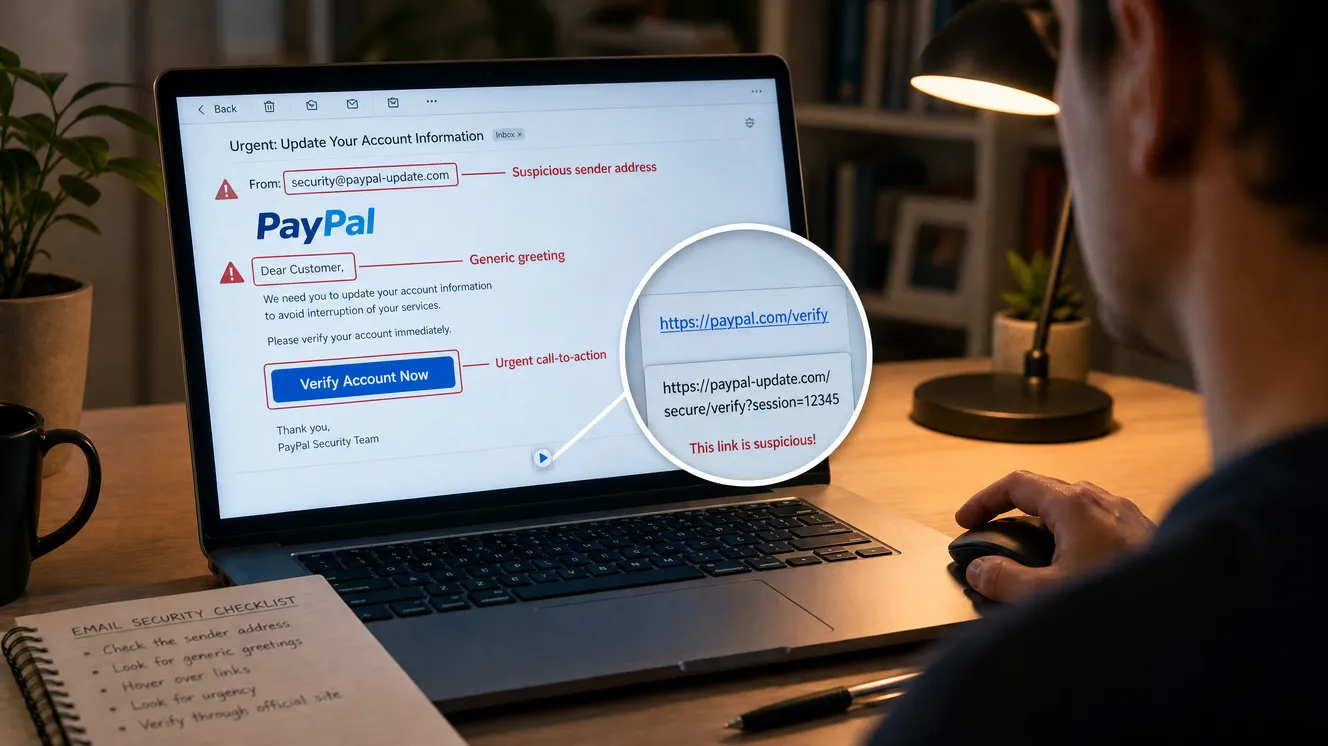
Here is the most important thing to understand about phishing: it does not attack your computer. It attacks you. The scammer cannot break your bank’s encryption or guess a strong password out of thin air, so instead they trick you into handing over the keys yourself. That makes phishing fundamentally a confidence trick dressed up in a corporate logo, and it means your best defense is not a piece of software but a habit of mind — a reflex to slow down and look before you act. The signs below are what you are looking for. None of them require technical skill. They just require that you stop assuming a message is real simply because it looks the part.
What Phishing Actually Is (and Why It Works)
Phishing is a form of social engineering — the art of manipulating people into giving up information or access. The Federal Trade Commission describes the basic move plainly: scammers send emails or text messages that look like they come from a company you know and trust — a bank, a credit card company, a delivery service, an online store, a payment app — and they tell a story to trick you into clicking a link or opening an attachment. The story is the engine. Suspicious activity on your account. A payment that failed. A package waiting. A refund you’re owed. Every one is built to trigger an emotion strong enough to override your caution before you’ve had time to think.
It works because it exploits how busy and trusting most of us are. We process dozens of messages a day on autopilot, and a well-made fake slides right into that stream looking exactly like the real thing. The scammer is betting that you will react out of habit — that you’ll tap the link to “sort it out” before any part of your brain asks whether the message is genuine. Defeating phishing is mostly a matter of interrupting that autopilot at the right moment.
The Five Signs of a Phishing Message
The Cybersecurity and Infrastructure Security Agency distills the warning signs into a short, memorable list. Learn these five and you will catch the overwhelming majority of phishing attempts.
1. Urgency and emotional pressure
This is the single most reliable tell. Phishing messages manufacture a sense of crisis: “Your account has been suspended.” “Unauthorized login detected.” “Respond within 24 hours or your service will be canceled.” The pressure is deliberate, because a frightened or rushed person makes worse decisions. Real companies do sometimes send time-sensitive notices, but they rarely threaten instant catastrophe to force you onto a link. Whenever a message’s main effect is to make your heart beat faster and your finger move toward a button, treat that feeling itself as a warning.
2. Requests for personal or financial information
A legitimate bank will never email or text you asking for your password, full card number, PIN, or Social Security number. Those are exactly the prizes a phisher is after. Any message that asks you to “confirm” or “verify” sensitive details by replying or following a link should be treated as hostile until proven otherwise. The same goes for one-time security codes — no real company will ever ask you to read your verification code back to them.
3. Links that don’t lead where they claim
The whole point of most phishing messages is to get you onto a fake login page. So the link is where the lie usually lives. On a computer, you can hover your mouse over a link without clicking to see the real destination address pop up — and if the displayed text says one thing while the actual address says another, that mismatch is a dead giveaway. Watch for web addresses that are almost-but-not-quite right (a real brand name with an extra word, a misspelling, or an odd ending), and be wary of shortened links that hide their true destination entirely. When in doubt, don’t click at all — navigate to the site yourself instead.
4. Unexpected attachments
An attachment you weren’t expecting is one of the most dangerous things in your inbox, because opening it can install malware on your device. Be especially suspicious of invoices, receipts, shipping notices, or “documents” you didn’t ask for, particularly when the message pressures you to open them quickly. If you weren’t expecting a file from that sender, don’t open it — verify first.
5. A sender address that doesn’t match
The display name on a message is trivially easy to fake; the actual address behind it is harder. Click or tap to reveal the full sender address and look closely. A message claiming to be from a major bank but sent from a random string of characters at a free email service, or from a domain that’s subtly misspelled, is a fraud. Scammers also “spoof” trusted names so the message appears to come from a real company — which is exactly why the sender field alone should never be your only proof that a message is genuine.
Phishing Red Flags at a Glance
⚑ Urgent or threatening language designed to make you act fast.
⚑ Asks for passwords, card numbers, codes, or other sensitive details.
⚑ Links that mismatch — the address differs from the displayed text or the real site.
⚑ Unexpected attachments you didn’t ask for.
⚑ A sender address that doesn’t match the company it claims to be.
⚑ A generic greeting (“Dear Customer”) or an offer too good to be true.
The Stories Scammers Tell
It helps to recognize the specific scripts, because phishing reuses the same few story-lines endlessly. The FTC lists the classics: a message claiming there’s been suspicious activity or a login attempt on your account; a warning that there’s a problem with your payment information; a demand that you confirm some personal detail; a fake invoice you don’t recognize; an instruction to click a link to make a payment; an offer of a coupon, refund, or free item; or a notice that you’re eligible to register for a government refund. More recent versions lean on everyday digital life — a failed package delivery, a streaming account “on hold,” rewards points about to expire, an unpaid toll. The surface details change with the seasons, but the underlying machine is always the same: a trusted-looking sender, a story that creates urgency, and a link or attachment that springs the trap.
It’s Not Just Email: Texts, Calls, and QR Codes
Phishing has spread far beyond the inbox, and the same instincts apply across every channel. Text-message phishing — sometimes called smishing — is now everywhere, precisely because people tend to trust and tap texts faster than emails. The toll-you-owe text, the package-redelivery text, the “is this you?” bank alert: same playbook, smaller screen, and a link that’s harder to inspect on a phone.
Phone-call phishing, or vishing, adds a human voice and often a spoofed caller ID that displays a real company’s number. A caller claiming to be from your bank’s fraud department, pressuring you to “verify” your account or move money to a “safe” account, is running the same con out loud. The defense is simple and worth memorizing: hang up, then call the company back on the number printed on your card or its official website — never a number the caller gives you. And watch for the newest twist, QR-code phishing: a scannable code on a flyer, parking meter, or email that sends your phone to a malicious site. A QR code is just a link you can’t read with your eyes, so treat one from an unknown source with the same caution you’d give a suspicious link.
Why “Just Look for Typos” No Longer Works
For years, the standard advice was that phishing emails gave themselves away with clumsy spelling and broken grammar. That advice is rapidly going stale. With modern AI writing tools, scammers can now generate flawless, professional-sounding messages in any language, in seconds, free of the awkward errors that used to be a reliable tell. The FBI has specifically flagged the rise of AI-assisted phishing that produces convincing, error-free lures at scale.
The lesson is not to abandon the other signs but to stop relying on polish as your filter. A message being well-written tells you nothing anymore about whether it’s genuine. So shift your attention from how a message is written to what it’s asking you to do. The request and the context are what give a scam away: Were you expecting this? Does a real company actually behave this way? Is it pushing you to act fast, click, or hand something over? Those questions still work perfectly, no matter how clean the writing looks.
The One Habit That Beats Almost Everything
If you remember nothing else, remember this: never use the contact path the message gives you to verify the message. That single discipline neutralizes the vast majority of phishing, because the entire scam depends on you trusting the link, the number, or the reply address it provides. CISA’s guidance is exactly this — if a message could possibly be real but anything feels off, don’t click any link or call any number inside it. Instead, reach the company a way you already trust.
In practice that means: if your “bank” texts about a problem, open your banking app or type the bank’s address into your browser yourself and check your account there. If an “order” email looks suspect, go to the retailer’s website directly and look at your order history. If a message appears to come from a friend or coworker asking for something unusual, contact them through a different channel — call or text the number you already have for them — and ask whether they really sent it. The few seconds this takes is the firewall the scammer cannot get around.
The Pause-and-Verify Routine
1. Stop. Notice the urgency. The feeling of needing to act now is itself the warning sign.
2. Scan for the five signs — pressure, info requests, mismatched links, surprise attachments, a wrong sender.
3. Don’t use the message. Skip its links and numbers entirely.
4. Verify independently. Open the app, type the known address, or call the number on your card.
5. Report and delete once you’ve confirmed it’s a fake.
If You Clicked or Replied
Everyone slips eventually, and panic only makes it worse, so act calmly and quickly. If you entered a password, change it immediately on the real site — and on any other account where you reused it — then turn on multi-factor authentication so a stolen password alone can’t get anyone in. If you opened an attachment or downloaded something, update your security software and run a full scan, removing anything it flags. If you gave up financial or identity details like a card or Social Security number, the FTC directs people to IdentityTheft.gov, which lays out the specific recovery steps based on exactly what was exposed. The faster you move, the smaller the damage — a changed password in the first hour can shut the door before the scammer walks through it.
How to Report Phishing
Reporting takes seconds and genuinely helps — it feeds the systems that block these messages for everyone else. The FTC’s recommended steps are easy to remember. Forward a phishing email to the Anti-Phishing Working Group at reportphishing@apwg.org. Forward a phishing text to SPAM, which is 7726 on most U.S. carriers. Then report the attempt to the FTC at ReportFraud.ftc.gov, and consider filing with the FBI’s IC3 as well. Most email and phone apps also have a built-in “report junk” or “report phishing” option that does the same job with one tap. After reporting, delete the message — and don’t click any “unsubscribe” link inside it, since on a phishing message even that can be a trap.
The Click Is the Trap. The Pause Is the Cure.
Phishing succeeds for one reason: it gets people to react before they think. Every other detail — the logo, the urgency, the convincing wording — exists to shrink the gap between the message arriving and you clicking. So the entire defense comes down to widening that gap. Notice the pressure. Run through the five signs. And never, ever verify a suspicious message using the link or number it handed you — reach the company a way you already trust instead.
You don’t need to be a security expert. You need one small, stubborn habit: a two-second pause before you click on anything that asks you to act fast or give something up. The scammers are counting on you not taking it. Take it anyway — and you’ll watch their whole trick fall apart.
When in doubt, don’t click. Look it up yourself.
This article is for general security education. Scammers’ tactics change constantly. For official, up-to-date guidance and reporting tools, consult the Cybersecurity and Infrastructure Security Agency, the Federal Trade Commission, and the FBI’s Internet Crime Complaint Center.
Leave a Reply