Watch vs. Warning vs. Advisory: The Three Words That Matter
Nearly every weather alert is one of three types, and understanding the distinction is the single most useful thing in this entire article. A Watch means be prepared — the conditions are favorable for dangerous weather to develop. Think of it as the ingredients being in place: a tornado, flood, or severe storm is possible in or near the area, which is usually large, covering many counties. A watch isn’t a signal to panic; it’s a signal to review your plan, stay alert, keep an eye on the sky, and be ready to act quickly if things escalate.
A Warning is the one that demands action. It means the dangerous weather is happening now or about to — spotted by trained observers or detected on radar — and there is imminent danger to life and property in a smaller, specific area. When a warning is issued for where you are, you don’t wait, watch the clouds, or finish what you’re doing. You take protective action immediately. The simplest way to hold the two apart: a watch means the ingredients are there; a warning means it’s actually happening.
The third word, Advisory, sits below a warning. It signals conditions that are hazardous or highly inconvenient but generally not life-threatening — the kind of weather where you should use caution and adjust your plans, but you’re not in mortal danger. (You may also, very rarely, encounter the word Emergency, as in a Tornado Emergency or Flash Flood Emergency. These are the most dire alerts the Weather Service issues, reserved for catastrophic, confirmed, life-threatening situations — when you see one, act instantly.)
The Three Words, Decoded
WATCH — Be Prepared. Conditions are favorable; the hazard is possible. Review your plan and stay alert.
WARNING — Take Action Now. The hazard is occurring or imminent. Shelter or act immediately.
ADVISORY — Use Caution. Hazardous but usually not life-threatening conditions. Be careful and adjust plans.
Make Sure the Alert Actually Reaches You
An alert can only protect you if you receive it — ideally while you’re asleep, or when the power and cell networks are struggling. That’s why the Weather Service stresses having more than one way to get warnings. Most modern phones automatically receive Wireless Emergency Alerts for serious threats like tornado and flash flood warnings; make sure those notifications are switched on in your settings. Pair that with a NOAA Weather Radio — a battery-powered or hand-crank model that broadcasts directly from the Weather Service and keeps working when the grid and your phone don’t. It’s the backbone of any serious weather-safety setup.
Round it out with a trusted weather app, the weather.gov site, and local TV or radio. And know the limits of outdoor warning sirens: they are designed to alert people who are outside, and you often cannot hear them indoors, asleep, or over the noise of a storm. Never treat the absence of a siren as the all-clear, and never wait to hear one before acting on an alert you’ve already received. Two independent ways to be warned is the minimum; three is better.
Where to Shelter: Tornadoes
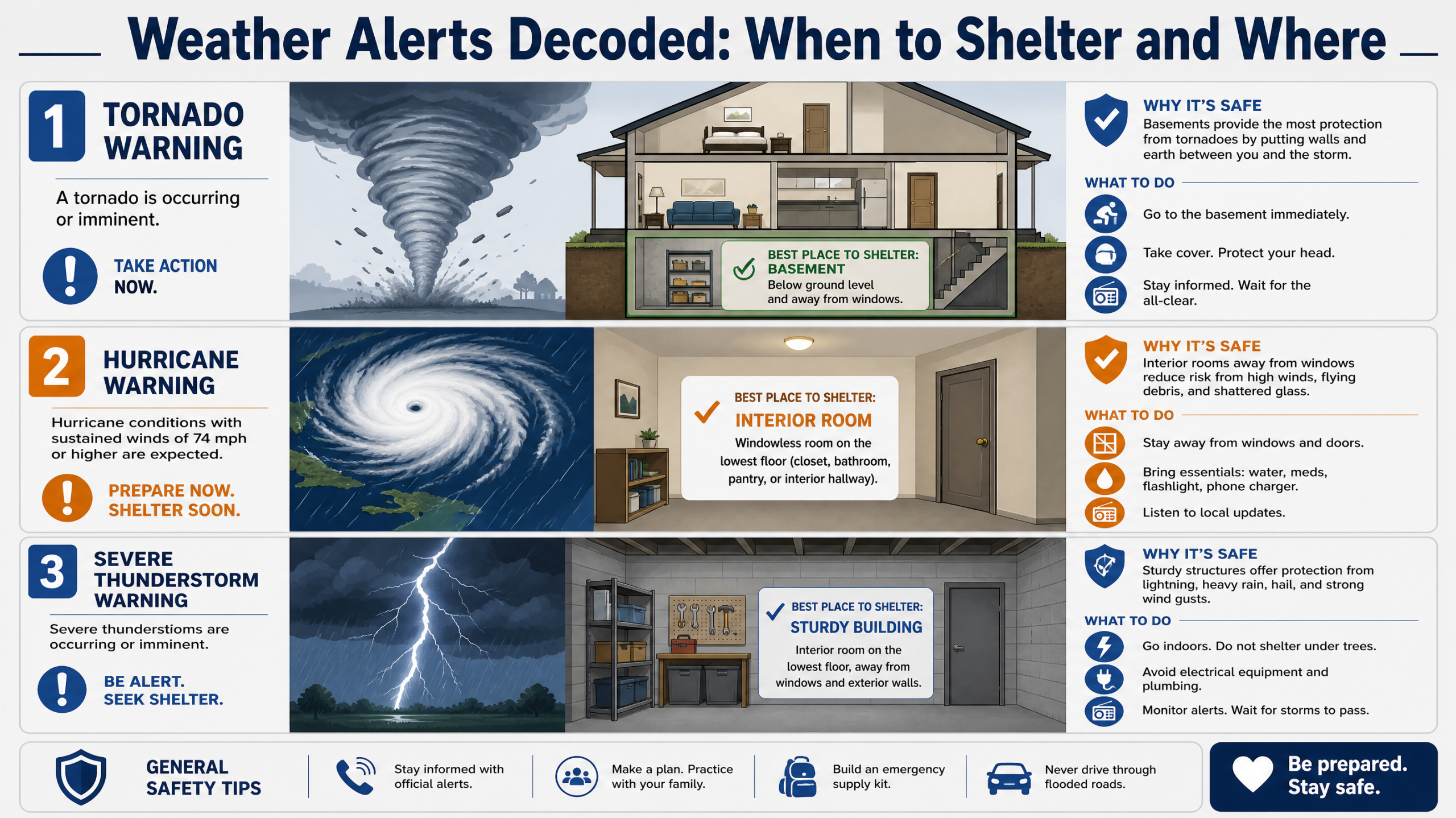
When a tornado warning is issued for your location, seek shelter immediately — you may have only minutes. The goal is to put as many walls as possible between you and the outside, as low as possible. Go to the lowest floor — a basement or storm cellar is ideal — and into a small interior room with no windows, such as a bathroom, closet, or center hallway. Crouch down and cover your head and neck with your arms, and add more protection if you can: a heavy blanket, a mattress, or even a bicycle or sports helmet to guard against the flying debris that causes most tornado injuries.
Some places are dangerous and should be left before the storm arrives. Mobile and manufactured homes are not safe in a tornado, even tied down — have a plan to get to a sturdy building or a designated community shelter while there’s still time. A vehicle offers little protection, and the old advice to hide under a highway overpass is wrong: overpasses can actually funnel and accelerate the wind, and they expose you to debris. If you’re caught driving with no sturdy building nearby, the guidance is difficult but clear — getting to a substantial shelter beats staying in the car, and lying flat in a low ditch away from the vehicle, covering your head, may be safer than an overpass.
Where to Shelter: Floods and Flash Floods
Flooding is the deadliest pattern here — flash floods are the number one storm-related killer in the United States — and the shelter rule is the opposite of a tornado’s: instead of going down and in, you go up and out. When a flash flood warning hits, move immediately to higher ground, climbing to safety before rising water can cut off your exit. Get out of low-lying spots, dips, washes, canyons, and anywhere near streams or drainage channels, which can turn from dry to deadly in minutes.
The most important flood rule of all concerns water you can see on a road: never walk or drive through it. Nearly half of all flash-flood deaths are vehicle-related, almost always because someone believed they could make it across. They couldn’t. Just six inches of moving water can knock an adult off their feet, a foot of water can float many cars, and eighteen to twenty-four inches will sweep away most vehicles, including trucks and SUVs. Worse, the water hides what the flood has done to the road beneath — it may be washed out entirely — along with debris and downed power lines. The Weather Service sums it up in three words worth memorizing: Turn Around, Don’t Drown. If you encounter a flooded road, turn around and find another way, every single time.
Where to Shelter: Lightning and Severe Thunderstorms
For lightning, the rule is gloriously simple: When Thunder Roars, Go Indoors. If you can hear thunder at all, you are already close enough to be struck — lightning can reach more than ten miles from the rain, sometimes from a sky that looks clear overhead. At the first rumble, get inside a substantial building (one with wiring and plumbing) or, if none is available, a hard-topped vehicle with the windows up. Carports, open garages, covered porches, picnic pavilions, and tents are not shelter — you need four real walls and a roof.
Once inside, stay there until 30 minutes after the last clap of thunder — most lightning casualties happen to people who left shelter too early or didn’t take it soon enough. Don’t be fooled when the rain stops; the threat lingers. While indoors, avoid anything that connects to the outside world electrically: stay off corded phones and electronics, away from plumbing like sinks and showers, and back from windows and doors. If you’re caught outside with no shelter at all, get off high ground, away from isolated tall trees, out of and away from water, and put down metal objects — but understand there is no truly safe place outdoors in a storm, which is exactly why getting in early matters so much.
Where to Shelter: Hurricanes, Winter Storms, and Extreme Temperatures
A hurricane or tropical storm gives you something the others don’t: days of warning, with watches issued around 48 hours ahead and warnings around 36. Use that time. The most important rule is to follow evacuation orders without hesitation — they’re issued because of storm surge, the wall of seawater that is the deadliest part of most hurricanes, and no house is worth riding it out. If you’re not in an evacuation zone and are sheltering in place, ride out the storm in an interior room on the lowest safe floor, away from all windows, and don’t be lured outside by the eerie calm of the eye, which is only the storm’s halfway point.
For a winter storm, blizzard, or ice storm, the safest shelter is usually your own home: stay in and stay off the roads, where the real danger lies. Prepare for possible power loss, keep warm with layers while conserving heat, and never use outdoor heat sources indoors. In extreme heat, move to air conditioning or a public cooling center, drink plenty of water, and never leave a child or pet in a parked car; in extreme cold, keep warm, watch for signs of hypothermia, and check that your heat sources are safe. Both temperature extremes are most dangerous to older adults, young children, and the chronically ill.
Rules That Apply to Every Alert
Whatever the hazard, a few habits make all the difference. Act early. The deadliest mistake in severe weather is waiting to confirm the danger with your own eyes before responding — by then your safety margin is gone. When a warning is issued, treat it as real and move; it’s always better to shelter for a storm that misses you than to be caught by one that doesn’t. Have a plan before the season starts: know which room is your tornado shelter, where higher ground is, how you’d evacuate, where your family will meet, and who your out-of-area contact is if local phones are jammed.
Know your local risks, since the threats in tornado country differ from those on a hurricane coast or in a flood-prone valley, and tailor your preparation accordingly. Keep an emergency kit ready — water, non-perishable food, flashlights, a first-aid kit, medications, and that weather radio — so you’re not assembling supplies as the sky darkens. And look out for the people around you: a quick call or knock to a neighbor who is elderly, disabled, or living alone may be the warning they didn’t receive. Decoding the alerts is the first step; the second is simply deciding, in advance, that when one arrives you will act on it without hesitation.
Know the Word, Know the Move
A weather alert is only as useful as your ability to act on it — and now you can. A watch means get ready; a warning means go. For a tornado you head down and in; for a flood you go up and out; for lightning you get inside and wait it out; for a hurricane you leave when they tell you to. Those few rules cover the great majority of dangerous weather most of us will ever face.
Set up two or three ways to receive alerts, make your shelter plan before you need it, and promise yourself one thing: when a warning comes, you’ll move first and second-guess later. The minutes you save by already knowing what the words mean and where to go are the minutes that matter most. Turn around, go indoors, head for higher ground, get to the lowest interior room — whichever the moment calls for, you’ll know it cold.
Watch means prepare. Warning means act — now.
This article is for general educational purposes. For authoritative, real-time guidance, see the National Weather Service and Ready.gov, and always follow the instructions of your local officials and emergency managers.
Leave a Reply